Showing posts with label CRM. Show all posts

Monday, September 18, 2017

RetrieveMultiple Using Newest Dynamics 365 SDK Gives Weird Behavior When Filtering on StateCode

Why in the world would it now be necessary to search using a conditionexpression on statecode by the strings "Active" or "Inactive"  instead of just taking the integer values of the optionset when performing a retrievemultiple request in a custom workflow activity.


 if (targetChildStateCode == 0)
                {
                    strTargetChildStateCode = "Active";
                }
                else if (targetChildStateCode == 1)
                {
                    strTargetChildStateCode = "Inactive";
                }
                int targetChildStatusReason = TargetChildStatusReason.Get(activityContext);
                tracingService.Trace("targetChildStateCode: " + targetChildStateCode.ToString());
                tracingService.Trace("targetChildStatusReason: " + targetChildStatusReason.ToString());
                tracingService.Trace("got parameters");
                tracingService.Trace("defined criteria and paging info");
               
                RetrieveMultipleRequest rmr = new RetrieveMultipleRequest();
                RetrieveMultipleResponse resp = new RetrieveMultipleResponse();
               
                QueryExpression query = new QueryExpression()
                {
                    EntityName = childEntityName,
                    ColumnSet = new ColumnSet(true),
                    Criteria = new FilterExpression
                    {
                        FilterOperator = LogicalOperator.And,
                        Conditions =
                        {
                            new ConditionExpression
                            {
                                AttributeName = childLookupAttributeToParent,
                                Operator = ConditionOperator.Equal,
                                Values = { primaryEntityId.ToString() }
                            },
                            new ConditionExpression
                            {
                                AttributeName = "statecode",
                                Operator = ConditionOperator.NotEqual,
                                Values = { strTargetChildStateCode }
                            }
                        }
                    }
                };


-head scratcher....

Saturday, November 12, 2016

Giving Up My MVP!!

Yes, I am giving up my MVP award at the end of the year.  I am retiring it to go work or Microsoft as a Premier Field Engineer.  I am shocked at how much I have to learn and am so excited for where this adventure takes me in the future.  I will try to keep you all updated.   I am so thrilled to have helped so many people over the years.  I know that I have made web requests over JScript and .NET much easier for some people and I continue to get a quarter of a million page views a year.

Thanks!!

Tuesday, February 23, 2016

How Do You Become a Microsoft Dynamics CRM MVP? What is it Like? WHAT DO WE GET?!?!

This months feature blogpost for Summit Group Software will tell us just that.  I will give you an insiders overview of the MVP program and why I love it so much.  :)

http://www.summitgroupsoftware.com/blog/insiders-overview-microsofts-mvp-program

Today I Learned in Dynamics CRM - Email Router Tip

I am allowed to still admit I don't know things.   That being said.

Pressing Approve or Reject Email address on a mailbox or queue box in the Dynamics CRM web application will also enable or disable them in the email router.

#TheMoreYouKnow

-Happy Tuesday!

Thursday, February 4, 2016

Get out of the habit of using new ColumnSet(true); in your Dynamics CRM .NET Code

Do you use new ColumnSet(true); to quickly pull all of the entity columns in one swoop.  Many times, unless a plugin gets run too often there is little impact on the system and it can seem innocent enough.  I have definitely been guilty in the past of this one myself and I want to share one situation where it can bite you in the rear.

So you are new to a specific CRM installation and you have been tasked to write a plugin to perform some task.  You need to update some fields in the account entity based on the data that's already on the entity.  You decide to use new ColumnSet(true); instead of pulling just the attributes you explicitly need to perform the intended function of the plugin, because heck, as developers we can be lazy sometimes and it takes longer to write out all the schema names you need for the specific attributes.

What you don't know is that the company's GP partner has an integration to GP that runs when a specific field on the account is updated.  Even if you don't change the value of that field, the system still sees it as an update because that attribute is now included in the entity you just updated... because you were lazy.

And you can replace the word "you" in that last paragraph with "I" because that's what I just did today. Whoops!

- Happy Thursday!

Tuesday, February 2, 2016

1 MILLION PAGE VIEWS: 8 FUN YEARS WITH DYNAMICS CRM

Evidently we are crossing the million pageview mark today as there are only 5 to go.  It's been a great 8 plus years I have had with Dynamics CRM!  Through CRM 3.0, 4.0, 2011, 2013, 2015, and 2016, it's been a fun ride so far.

Thanks to everyone who makes our community great!


Woops! Wrong photo, yes I am fat, but I have been losing weight, I was 260 at the beginning of December. 

Here's the right image.  :)


Wednesday, January 27, 2016

Tuesday, January 5, 2016

New Analytics and BI Options in Microsoft Dynamics CRM Online

I just posted a new blog at my new blog page for my employer detailing Excel Templating and other new BI / Analytics options in Microsoft Dynamics CRM Online 2016.

Check it out below:

http://www.summitgroupsoftware.com/blog/new-reporting-and-analytics-options-microsoft-dynamics-crm-2016-online-ssr-wha 


-Happy Tuesday!

Monday, January 4, 2016

Dynamics CRM MVP Award Renewed for Fifth Time. Happy New year!!

I found out on January First I have been renewed for a fifth year as a Microsoft Dynamics CRM MVP for 2016!!!

This year I plan on trying some new things, like Pluralsight authoring.  Should be an interesting year.

Happy New Year!

-

Monday, November 16, 2015

Great Insights From the Global MVP Summit on Microsoft Dynamics CRM Written by me But Published by Dynamics University


Check out my blogpost directly from Dynamics University to find out what we do at the Global MVP Summit and check out my thoughts on where Dynamics CRM is headed.

Insights from Microsoft Global MVP Summit on Microsoft Dynamics CRM


- Happy Monday!

Monday, July 20, 2015

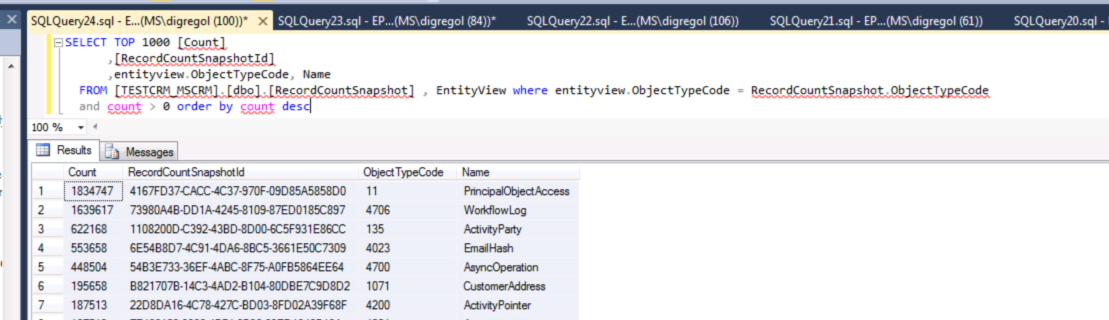
How to Easily Get Record Counts for Entitys in Microsoft Dynamics CRM

You can quickly get record counts for all of your entities if you need to using the RecordCountShapshot table in Dynamics CRM.  You aren't supposed to do select queries against  tables so I wouldn't recommend doing this in an integration or something like that.  But if you need a quick ball park of how many records are in each table, it's not a bad option.


SELECT TOP 1000 [Count]

,[RecordCountSnapshotId]

,entityview.ObjectTypeCode, Name

FROM [TESTCRM_MSCRM].[dbo].[RecordCountSnapshot] , EntityView where entityview.ObjectTypeCode = RecordCountSnapshot.ObjectTypeCode

and count > 0 order by count desc

Here is what the results look like:


-Happy Monday!!

Thursday, April 16, 2015

2013 CRM Field Guide is Now Available!!

Written by a number of MVP's it is a great source of knowledge on just about everything you could encounter in working with the product.  It's nearly 1000 pages of greatness.

Get your copy HERE:  http://www.crmfieldguide.com/

Tuesday, July 8, 2014

Problems Activating the SharePoint 2013 List Component

If you are having problems activating the SharePoint list component for CRM 2013 and SharePoint 2013 and the activate button is grayed out. You can try the method below if you didn't install SharePoint on a domain controller.

  http://030bacf.netsolhost.com/WordPress/?p=780

If you did install CRM 2013 on your domain controller like a lot of us Pre-sales guys used to do in the SP 2010 days, just slap yourself in the head right now.  It appears you are beyond hope and need to break out your SharePoint server to another box that is not a domain controller.  That's what I did today....  :(

References:

https://community.dynamics.com/crm/f/117/t/106468.aspx

I found another reference to this same thing being the issue too but now I can't find it again.  I never found anyone that ever got around it in any other way than breaking out the servers.

It worked for me also.  I still had to provision the code hosting service (top link+), but after I did that it worked fine.

Happy Tuesday.................................... :P

Tuesday, May 6, 2014

Zack Wenthe From RBA Will be Talking About Automated Marketing in Dynamics CRM at CRMUG Minneapolis on Thursday!

http://www.crmug.com/events/crmugMSP5814 

CRMUG Minnesota (Twin Cities) Regional Chapter Meeting (May 2014)

Join us for the next meeting of the CRMUG Minnesota (Twin Cities) Regional Chapter at the local Microsoft office in Edina on Thursday, May 8th from 8:30 am to 12:00 pm. This is a prime opportunity to learn from the experience of other users in your area, share your CRM knowledge, and make valuable connections with local users who share similar goals, priorities and CRM objectives.
Meeting Date & Time: Thursday, May 8th, 2014 from 8:30 am - 1:00pm CT
Agenda*:
8:30 - 9:00am - Registration and Networking
9:00 - 9:30 - Welcome & CRMUG Chapter Business
9:30 - 10:00 - User Adoption Case Study - Taylor Corporation/Commercial Print Group
10:00 - 12:00pm - Marketing in CRM: Crawl, Walk, Run - presented by RBA Consulting
*Agenda is not final. While this is highly representative of the structure of the regional chapter meeting, the final agenda will be made available 2 weeks prior to the meeting. We encourage you to check back for the latest or check your Collaborate community. 
Audience: All Dynamics CRM users are welcome. We also encourage you to invite your colleagues and other users within the region. Partners are welcome to attend provided they are accompanied by a customer. Partners please bear in mind that the objective of Regional Chapters is to exchange knowledge and Dynamics CRM experience. Partner personnel should possess deep CRM expertise and refrain from sales activities.
About CRMUG Regional Chapters: Regional Chapters enhance your membership in CRMUG by offering face-to-face interaction and knowledge-sharing with other Microsoft Dynamics CRM users in your region. By having meetings centrally located within your region, users from all job roles and levels in your company can participate by only driving a short distance. All job roles are welcome, including Customer Service, Sales, Information Technology, etc. Join us so you can optimize the functionality, flexibility, performance and return on investment offered by CRM and get better results from your CRM implementation ba

Event Type

Regional Chapter

Location Details

Microsoft3601 West 76th Street, Suite 600Phone: (952) 832-8000EdinaMN55435

Schedule

Firefox Refresh Issues In CRM 2013

I could not get a new custom workflow action to show up in the workflow editor today.  I tried ctrl+f5, closing the browser and restarting, cleaning, rebuilding, and re-updating the assembly.  All of my other workflow steps were still available.

Finally tried a different web browser.

Showed up fine in Internet Explorer.

Tuesday, January 7, 2014

CRMTipOfTheDay.com Has Launched!

If you haven't seen this site yet it's a handful of MVP's (including myself) providing you with a quick tip on a near day basis.  It's kind of a fun little site.  We have just over 40 tips out there so far.  Run through it if you get a chance and learn a few quick things.


- Happy Tuesday!

Thursday, January 2, 2014

I Have Been Renewed as a Microsoft MVP for 2014!

I received  notification yesterday that I have been renewed for 2014 as a Microsoft MVP for Dynamics CRM.  This is pretty exciting.  It should be an awesome year.

-

Tuesday, December 3, 2013

Error Installing CRM 2013 and Funny Resolution: Action Microsoft.Crm.Setup.Server.GrantConfigDBDatabaseAccessAction failed

I ran into an interesting error the other day installing Microsoft Dynamics CRM  2013 for a client. The error was:

 Microsoft.Crm.Setup.Server.GrantConfigDBDatabaseAccessAction failed.

Windows NT user or group 'domainname\SQLAccessGroup {xxxxxxxx-xxxx-xxxx-xxxx-xxxxxxxxxxxx}' not found. Check the name again.


We searched high and low for someone else experiencing the same error and we found several blogs and threads where people had resolved this for CRM 2011 and CRM 4.0 by a variety of different means.

Here are some examples and a quick blurb about the resolutions (that I think are all false).

1 http://crm2011andsilverlight.blogspot.com/2011/11/action-microsoftcrmsetupservergrantconf.html - resolution: exit SQL Server Management Studio on all boxes.

2 http://weblogs.asp.net/pabloperalta/archive/2011/09/01/microsoft-crm-setup-server-grantconfigdbdatabaseaccessaction-failed-windows-nt-user-or-group-mydomain-sqlaccessgroup-not-found-check-the-name-again.aspx - resolution: close remote desktop on the SQL Server

3 http://blog.expertsoftware.co.uk/post/2010/05/04/CRM-4-Install-and-SQL-Error-15401.aspx resolution: clear Kerberos tickets on the SQL server, reset some passwords, etc....

4 http://social.microsoft.com/Forums/en-US/65543208-6263-45d0-9801-237c0767a4da/crm-2011-rtm-install-error?forum=crm resolution: make sure the user is a member of all the created AD security groups on the CRM Install

5 http://nishantrana.wordpress.com/2013/05/07/fixed-microsoft-crm-setup-server-grantconfigdbdatabaseaccessaction-failed-windows-nt-user-or-group-sqlaccessgroup-not-found-in-crm-2011/ resolution: close SQL Management Studio and disconnect your remote desktop session.

 6 http://blog.aggregatedintelligence.com/2012/11/crm-2011-action-microsoftcrmsetupserver.html - resolution: delete your AD groups created by the install????


One thing you will notice pretty quickly is that there isn't any real rhyme or reason to these solutions and some of them seem pretty nonsensical, but if you read the comments, these posts did seem to help a lot of people (except number 6), but why????

Let's discuss that quickly...

Upon further examination I have determined that while they may all work, they are not really the solution.

The real reason this is happening in most of these cases is Active Directory replication delays where there is more than 1 domain controller in an active-active scenario.

The real solution is waiting 5 minutes when you get this error and hit retry.  Basically the server install is creating the active directory groups against one domain controller and then it is hitting the other domain controller to perform another action shortly after before the synchronization is finished between the domain controllers.  :). So absolutely anything that takes a few minutes or restarts a server or causes an update on the domain controller would work.  That's why there is no cohesiveness between the resolutions.

- Happy Tuesday!!

-

Tuesday, November 5, 2013

Demo Builder is Building Demos on Dynamics CRM 2013

I built a CRM demo for a client the other day using Demo Builder ( http://demobuilder.cloudapp.net/ ) .  This tool is such a great starting point for demo's because you get a lot of great extra's and demo data that would take you awhile to put together in your own personal organization.  It also comes pre-configured with the out-of-the-box SharePoint integration already set up, along with the partner and customer portals already configured in Azure.  Lots of good stuff.

I had asked a Microsoft representative when the demo builder would start building demo's on CRM 2013 and they stated sometime later in November.  Evidently that came sooner than expected because it is building demo's on 2013 now.  If you do the standard demo (still labeled Polaris) it will build a 2013 org with the demo elements configured..

--Happy Tuesday!