Showing posts with label Microsoft Dynamics CRM. Show all posts

Monday, September 18, 2017

RetrieveMultiple Using Newest Dynamics 365 SDK Gives Weird Behavior When Filtering on StateCode

Why in the world would it now be necessary to search using a conditionexpression on statecode by the strings "Active" or "Inactive"  instead of just taking the integer values of the optionset when performing a retrievemultiple request in a custom workflow activity.


 if (targetChildStateCode == 0)
                {
                    strTargetChildStateCode = "Active";
                }
                else if (targetChildStateCode == 1)
                {
                    strTargetChildStateCode = "Inactive";
                }
                int targetChildStatusReason = TargetChildStatusReason.Get(activityContext);
                tracingService.Trace("targetChildStateCode: " + targetChildStateCode.ToString());
                tracingService.Trace("targetChildStatusReason: " + targetChildStatusReason.ToString());
                tracingService.Trace("got parameters");
                tracingService.Trace("defined criteria and paging info");
               
                RetrieveMultipleRequest rmr = new RetrieveMultipleRequest();
                RetrieveMultipleResponse resp = new RetrieveMultipleResponse();
               
                QueryExpression query = new QueryExpression()
                {
                    EntityName = childEntityName,
                    ColumnSet = new ColumnSet(true),
                    Criteria = new FilterExpression
                    {
                        FilterOperator = LogicalOperator.And,
                        Conditions =
                        {
                            new ConditionExpression
                            {
                                AttributeName = childLookupAttributeToParent,
                                Operator = ConditionOperator.Equal,
                                Values = { primaryEntityId.ToString() }
                            },
                            new ConditionExpression
                            {
                                AttributeName = "statecode",
                                Operator = ConditionOperator.NotEqual,
                                Values = { strTargetChildStateCode }
                            }
                        }
                    }
                };


-head scratcher....

Friday, August 25, 2017

Plugin Profiler Causing Problems

Working in Dynamics 365 doing plugin development was problematic yesterday.  I've seen more than one occasion now where I can't get a plugin to work properly and there is no obvious reason why.  It turned out that uninstalling and reinstalling the plugin profiler solution fixed the issue with no code change.

The profiler must be caching something......

I hope this helps someone else and I am not the only person seeing this wonky behavior!

Saturday, November 12, 2016

Giving Up My MVP!!

Yes, I am giving up my MVP award at the end of the year.  I am retiring it to go work or Microsoft as a Premier Field Engineer.  I am shocked at how much I have to learn and am so excited for where this adventure takes me in the future.  I will try to keep you all updated.   I am so thrilled to have helped so many people over the years.  I know that I have made web requests over JScript and .NET much easier for some people and I continue to get a quarter of a million page views a year.

Thanks!!

Friday, April 8, 2016

Today I learned in Dynamics CRM: Cannot Create New Views for Connection Roles

So today I learned that you cannot create new system views for connection roles in Dynamics CRM 2016 on-premise update 1.  The system does, however, allow you to customize the existing connection roles in the system.  So I had to hijack the inactive roles view and make it into something different.  I hope they allow this in the future.  My customer just wanted a view that only shows roles from a particular category.  Again, I was able to work around this by repurposing the inactive roles view.

- Have a great Weekend

- Oh, and I am down 35 lbs since December to 225 from 260!!

Tuesday, February 23, 2016

How Do You Become a Microsoft Dynamics CRM MVP? What is it Like? WHAT DO WE GET?!?!

This months feature blogpost for Summit Group Software will tell us just that.  I will give you an insiders overview of the MVP program and why I love it so much.  :)

http://www.summitgroupsoftware.com/blog/insiders-overview-microsofts-mvp-program

Today I Learned in Dynamics CRM - Email Router Tip

I am allowed to still admit I don't know things.   That being said.

Pressing Approve or Reject Email address on a mailbox or queue box in the Dynamics CRM web application will also enable or disable them in the email router.

#TheMoreYouKnow

-Happy Tuesday!

Thursday, February 4, 2016

Get out of the habit of using new ColumnSet(true); in your Dynamics CRM .NET Code

Do you use new ColumnSet(true); to quickly pull all of the entity columns in one swoop.  Many times, unless a plugin gets run too often there is little impact on the system and it can seem innocent enough.  I have definitely been guilty in the past of this one myself and I want to share one situation where it can bite you in the rear.

So you are new to a specific CRM installation and you have been tasked to write a plugin to perform some task.  You need to update some fields in the account entity based on the data that's already on the entity.  You decide to use new ColumnSet(true); instead of pulling just the attributes you explicitly need to perform the intended function of the plugin, because heck, as developers we can be lazy sometimes and it takes longer to write out all the schema names you need for the specific attributes.

What you don't know is that the company's GP partner has an integration to GP that runs when a specific field on the account is updated.  Even if you don't change the value of that field, the system still sees it as an update because that attribute is now included in the entity you just updated... because you were lazy.

And you can replace the word "you" in that last paragraph with "I" because that's what I just did today. Whoops!

- Happy Thursday!

Tuesday, February 2, 2016

1 MILLION PAGE VIEWS: 8 FUN YEARS WITH DYNAMICS CRM

Evidently we are crossing the million pageview mark today as there are only 5 to go.  It's been a great 8 plus years I have had with Dynamics CRM!  Through CRM 3.0, 4.0, 2011, 2013, 2015, and 2016, it's been a fun ride so far.

Thanks to everyone who makes our community great!


Woops! Wrong photo, yes I am fat, but I have been losing weight, I was 260 at the beginning of December. 

Here's the right image.  :)


Wednesday, January 27, 2016

Tuesday, January 5, 2016

New Analytics and BI Options in Microsoft Dynamics CRM Online

I just posted a new blog at my new blog page for my employer detailing Excel Templating and other new BI / Analytics options in Microsoft Dynamics CRM Online 2016.

Check it out below:

http://www.summitgroupsoftware.com/blog/new-reporting-and-analytics-options-microsoft-dynamics-crm-2016-online-ssr-wha 


-Happy Tuesday!

Monday, January 4, 2016

Dynamics CRM MVP Award Renewed for Fifth Time. Happy New year!!

I found out on January First I have been renewed for a fifth year as a Microsoft Dynamics CRM MVP for 2016!!!

This year I plan on trying some new things, like Pluralsight authoring.  Should be an interesting year.

Happy New Year!

-

Monday, November 16, 2015

Great Insights From the Global MVP Summit on Microsoft Dynamics CRM Written by me But Published by Dynamics University


Check out my blogpost directly from Dynamics University to find out what we do at the Global MVP Summit and check out my thoughts on where Dynamics CRM is headed.

Insights from Microsoft Global MVP Summit on Microsoft Dynamics CRM


- Happy Monday!

Friday, September 11, 2015

CRM Quick Connect from .NET Example App is Out on CodePlex

I wish when I was first learning to code in .NET for Dynamics CRM that I had a really quick example of how to make a connection.  I created this example in CodePlex.  It does little more than pops open a connection to CRM and gives your User ID guid back to you but it will show you how to get that far quickly.  The example applies to Dynamics CRM versions 2011 through 2015.

Download it here:  https://dynamicscrmquickconnect.codeplex.com/


I hope this helps!  Have a great weekend!

Monday, July 20, 2015

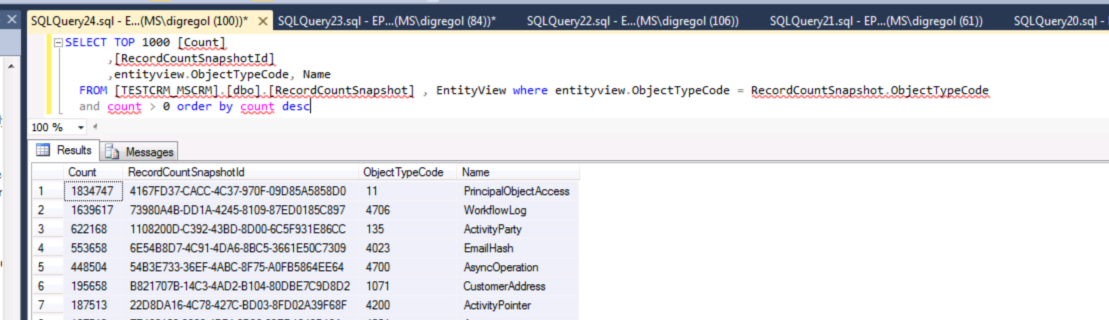
How to Easily Get Record Counts for Entitys in Microsoft Dynamics CRM

You can quickly get record counts for all of your entities if you need to using the RecordCountShapshot table in Dynamics CRM.  You aren't supposed to do select queries against  tables so I wouldn't recommend doing this in an integration or something like that.  But if you need a quick ball park of how many records are in each table, it's not a bad option.


SELECT TOP 1000 [Count]

,[RecordCountSnapshotId]

,entityview.ObjectTypeCode, Name

FROM [TESTCRM_MSCRM].[dbo].[RecordCountSnapshot] , EntityView where entityview.ObjectTypeCode = RecordCountSnapshot.ObjectTypeCode

and count > 0 order by count desc

Here is what the results look like:


-Happy Monday!!

Wednesday, May 27, 2015

Microsoft Dynamics CRM 2015 Online is Scheduling Product Upgrades to Update 1

A week ago I was getting frustrated because I love the new features that are coming down the pipe in Update 1 and my sandbox orgs are already upgraded, but I couldn't schedule my Update 1 for my production org.

Yesterday I finally was able to get it scheduled.  The dates are already pushed out into July so you might want to get on that though!


-Happy Wednesday!

Monday, March 23, 2015

Surface Pro 3 Giveaway and New Branding Release for TechAir Group!

Techair is very excited to have released their new site and branding last week and we are giving away a Surface Pro 3 to celebrate!


Check out our site at www.techairgroup.com and get registered for our SURFACE PRO 3 GIVEAWAY by filling out the form on our website!


- Happy Monday!

Tuesday, January 27, 2015

ADFS Self Signed Certificates and Microsoft Dynamics CRM.

ADFS Self-Signed Certificates are used for internal encryption and are separate from your SSL certificates.   You can sometimes experience a situation where these internal certificates auto-rollover.  when this happens it will bring CRM down.

Below is a blog that has a fix for this that seems to work if you follow all the steps to a T:

http://blogs.msdn.com/b/arpita/archive/2012/07/17/microsoft-dynamics-crm-2011-log-in-issue-due-to-ad-fs-certificate-rollover.aspx 

Additionally there is a way to push the date out using Powershell to make the renewal duration more like 5 years instead of every 365 days.

- Happy Tuesday!

Tuesday, July 8, 2014

Problems Activating the SharePoint 2013 List Component

If you are having problems activating the SharePoint list component for CRM 2013 and SharePoint 2013 and the activate button is grayed out. You can try the method below if you didn't install SharePoint on a domain controller.

  http://030bacf.netsolhost.com/WordPress/?p=780

If you did install CRM 2013 on your domain controller like a lot of us Pre-sales guys used to do in the SP 2010 days, just slap yourself in the head right now.  It appears you are beyond hope and need to break out your SharePoint server to another box that is not a domain controller.  That's what I did today....  :(

References:

https://community.dynamics.com/crm/f/117/t/106468.aspx

I found another reference to this same thing being the issue too but now I can't find it again.  I never found anyone that ever got around it in any other way than breaking out the servers.

It worked for me also.  I still had to provision the code hosting service (top link+), but after I did that it worked fine.

Happy Tuesday.................................... :P