I have been following Karoline Klever's project for a little while now and covered the release of the 4.0 version here. The project is pretty cool because it makes it really quick to connect ASP.NET websites up to Microsoft Dynamics CRM
The new version is in it's Alpha stages but it works for CRM 2011 On-Premise. You can read her blog post about the release at:
http://karolikl.blogspot.com/2012/03/epinovacrmframework-20-alpha-version.html
You can also download and try the new version here:
http://crmframework.codeplex.com/
Karoline says that next steps for this tool-set are to add Online support and work on any outstanding issues.
- Hope you all have a nice day!
Wednesday, March 14, 2012


Tuesday, March 13, 2012
Disassociate an Entity Record From Another Entity Record in Microsoft Dynamics CRM 2011 Using C# in Silverlight
This tutorial will show you how to disassociate an entity record from another entity record in Microsoft Dynamics CRM 2011 using C# in Silverlight.
First things first. You have to set up your Silverlight app to make a web services connection to CRM. The best tutorial I have found for this is located here in the MSDN:
http://msdn.microsoft.com/en-us/library/gg594452.aspx
Here is the call in C#:
You will notice that the biggest change in thinking and syntax will be that you have to specify your request and response properties as strings explicitly in code.
Really though once you understand the differences in working with the two concepts it really isn't a tough nut to crack.
-
First things first. You have to set up your Silverlight app to make a web services connection to CRM. The best tutorial I have found for this is located here in the MSDN:
http://msdn.microsoft.com/en-us/library/gg594452.aspx
Here is the call in C#:
OrganizationRequest request = new OrganizationRequest() { RequestName = "Disassociate" };

//Target is the entity that you are associating your entities to.
EntityReference entrefTarget = new EntityReference();
entrefTarget.Id = new Guid("06AA44B1-336B-E111-B3CA-1CC1DEF1B5FF");
entrefTarget.LogicalName = "account";
request["Target"] = entrefTarget;

//RelatedEntities are the entities you are associating to your target (can be more than 1)
EntityReferenceCollection entrefcolCollection = new EntityReferenceCollection();
EntityReference entrefRelatedEntity1 = new EntityReference();
entrefRelatedEntity1.Id = new Guid("32B365C9-5F0C-E111-BF0B-1CC1DEE89AA8");
entrefRelatedEntity1.LogicalName = "contact";
entrefcolCollection.Add(entrefRelatedEntity1);
request["RelatedEntities"] = entrefcolCollection;


//The relationship schema name in CRM you are using to associate the entities.
//found in settings - customization - entity - relationships
Relationship relRelationship = new Relationship();
relRelationship.SchemaName = "contact_customer_accounts";
request["Relationship"] = relRelationship;

//execute the request
IOrganizationService service = SilverlightUtility.GetSoapService();

//depending on how you do things your calls will most likely be asynchronous
service.BeginExecute(request, new AsyncCallback(Associate_Callback), service);
You will notice that the biggest change in thinking and syntax will be that you have to specify your request and response properties as strings explicitly in code.
Really though once you understand the differences in working with the two concepts it really isn't a tough nut to crack.
-
Monday, March 12, 2012
Associate an Entity Record with Another in Microsoft Dynamics CRM 2011 Using C# in Silverlight
This tutorial will show you how to associate an entity record to another entity record in Microsoft Dynamics CRM 2011 using C# in Silverlight.
First things first. You have to set up your Silverlight app to make a web services connection to CRM. The best tutorial I have found for this is located here in the MSDN:
http://msdn.microsoft.com/en-us/library/gg594452.aspx
Here is the call in C#:
You will notice that the biggest change in thinking and syntax will be that you have to specify your request and response properties as strings explicitly in code.
Really though once you understand the differences in working with the two concepts it really isn't a tough nut to crack.
First things first. You have to set up your Silverlight app to make a web services connection to CRM. The best tutorial I have found for this is located here in the MSDN:
http://msdn.microsoft.com/en-us/library/gg594452.aspx
Here is the call in C#:
private void AssociateAccount(Guid guidResult)
{
    OrganizationRequest request = new OrganizationRequest() { RequestName = "Associate" };

    //Target is the entity that you are associating your entities to.
    EntityReference entrefTarget = new EntityReference();
    entrefTarget.Id = guidResult;
    entrefTarget.LogicalName = "account";
    request["Target"] = entrefTarget;

    //RelatedEntities are the entities you are associating to your target (can be more than 1)
    EntityReferenceCollection entrefcolCollection = new EntityReferenceCollection();
    EntityReference entrefRelatedEntity1 = new EntityReference();
    entrefRelatedEntity1.Id = new Guid("32B365C9-5F0C-E111-BF0B-1CC1DEE89AA8");
    entrefRelatedEntity1.LogicalName = "contact";
    entrefcolCollection.Add(entrefRelatedEntity1);
    request["RelatedEntities"] = entrefcolCollection;


    //The relationship schema name in CRM you are using to associate the entities.
    //found in settings - customization - entity - relationships
    Relationship relRelationship = new Relationship();
    relRelationship.SchemaName = "contact_customer_accounts";
    request["Relationship"] = relRelationship;

    //execute the request
    IOrganizationService service = SilverlightUtility.GetSoapService();

    //depending on how you do things your calls will most likely be asynchronous
    service.BeginExecute(request, new AsyncCallback(Associate_Callback), service);
}

 private void Associate_Callback(IAsyncResult result)
{
    try
    {
        OrganizationResponse response = ((IOrganizationService)result.AsyncState).EndExecute(result);


    }
    catch (Exception ex)
    {
        ReportError(ex);
    }
}
You will notice that the biggest change in thinking and syntax will be that you have to specify your request and response properties as strings explicitly in code.
Really though once you understand the differences in working with the two concepts it really isn't a tough nut to crack.
Thursday, March 8, 2012
SQL Server 2012 is Now Officially Supported for Microsoft Dynamics CRM 2011 and Also 4.0
An interesting turn of events occurred yesterday. Support for SQL Server 2012 in Microsoft Dynamics CRM 2011 was originally slated to be part of the Q2 2012 service update as noted at these locations:
- http://crmpublish.blob.core.windows.net/docs/ReleasePreviewGuide.pdf
- http://blogs.msdn.com/b/crm/archive/2012/03/07/microsoft-dynamics-crm-and-sql-server-2012-better-together.aspx
BUT..... according to some super secret sources (along with these KB Articles :) ), Microsoft will currently support SQL Server 2012 on both CRM 2011 and even 4.0 as of Update Rollup 6 and Update Rollup 21 respectively.
- http://support.microsoft.com/kb/2669061
- http://support.microsoft.com/kb/2686619
IMPORTANT NOTES:
- One item of note is that you need to re-install the data connector for both CRM 2011 and 4.0 after installation if upgrading otherwise reporting services will not work.
Just be warned, that it's not perfect yet and Microsoft is working on a couple of issues, but they will have hot-fixes out for these soon. The issues below are both noted in the KB articles above.
- One issue in 4.0 can cause reports not to be displayed and there isn't a workaround, but a hotfix is coming.
- Lastly, in CRM 2011, there is still an issue they are working on that can cause the outlook client to fail when using SQL 2012. A hotfix is also actively being worked on for this at this time also.
Happy Thursday Everyone !!
-
- http://crmpublish.blob.core.windows.net/docs/ReleasePreviewGuide.pdf
- http://blogs.msdn.com/b/crm/archive/2012/03/07/microsoft-dynamics-crm-and-sql-server-2012-better-together.aspx
BUT..... according to some super secret sources (along with these KB Articles :) ), Microsoft will currently support SQL Server 2012 on both CRM 2011 and even 4.0 as of Update Rollup 6 and Update Rollup 21 respectively.
- http://support.microsoft.com/kb/2669061
- http://support.microsoft.com/kb/2686619
IMPORTANT NOTES:
- One item of note is that you need to re-install the data connector for both CRM 2011 and 4.0 after installation if upgrading otherwise reporting services will not work.
Just be warned, that it's not perfect yet and Microsoft is working on a couple of issues, but they will have hot-fixes out for these soon. The issues below are both noted in the KB articles above.
- One issue in 4.0 can cause reports not to be displayed and there isn't a workaround, but a hotfix is coming.
- Lastly, in CRM 2011, there is still an issue they are working on that can cause the outlook client to fail when using SQL 2012. A hotfix is also actively being worked on for this at this time also.
Happy Thursday Everyone !!
-
Wednesday, March 7, 2012
How to Retrieve an Entity Instance in Microsoft Dynamics CRM 2011 with VB.NET
This illustration shows how to use RetrieveRequest to retrieve an entity instance in Microsoft Dynamics CRM 2011 with VB.NET
Ok, here is what the code looks like!
In VB.NET
In VB.NET
'Method 1
Dim reqRetrieve1 As New RetrieveRequest()
reqRetrieve1.ColumnSet = New ColumnSet(True)
reqRetrieve1.Target = New EntityReference(Account.EntityLogicalName, New Guid("CCB265C9-5F0C-E111-BF0B-1CC1DEE89AA8"))
Dim respRetrieve1 As RetrieveResponse = DirectCast(slos.Execute(reqRetrieve1), RetrieveResponse)

'Method2
Dim entRetrieved As Entity = slos.Retrieve(Account.EntityLogicalName, New Guid("CCB265C9-5F0C-E111-BF0B-1CC1DEE89AA8"), New ColumnSet(True))
Thats all there is to it!
-
-
Tuesday, March 6, 2012
Moving Form Labels Above the Field Instead of on Side of Field in Microsoft Dynamics CRM 2011
I know that I have had trouble in the past when I make a new four column section, getting everything to fit on the form, and by default you need to re-size the form on open to even get everything to fit unless you can find a way to shrink your fields down. I know there are settings to change the amount of space given to the label, but I have found another way to tackle this.
I was in the car with three other MVP's one day and Scott Sewell starts talking to the other about how he swears by putting the labels for form fields on top of the fields instead of off to the left side. I know at least two of the MVP's in the car (I was one of them) almost jumped out of their seat.
Here is how it works:
1. The setting is at the section level. So, double-click on a section to bring up the section properties.


- I hope this helps!
I was in the car with three other MVP's one day and Scott Sewell starts talking to the other about how he swears by putting the labels for form fields on top of the fields instead of off to the left side. I know at least two of the MVP's in the car (I was one of them) almost jumped out of their seat.
Here is how it works:
1. The setting is at the section level. So, double-click on a section to bring up the section properties.

2. Now, click on the formatting tab and scroll to the bottom to find the "Field Label Position" setting:
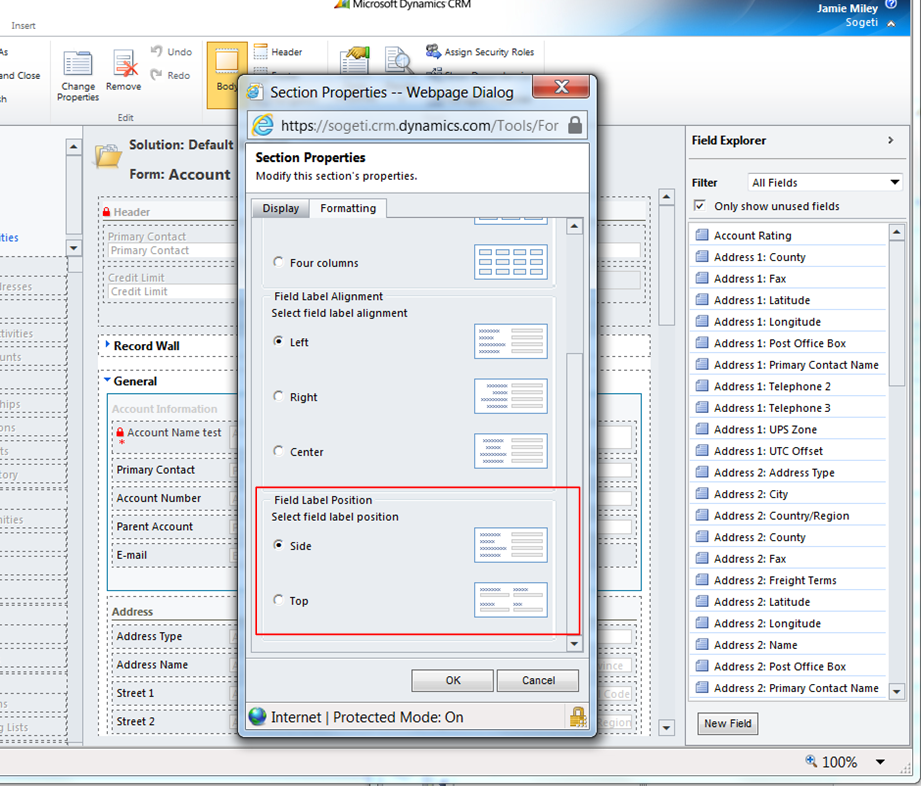
3. Now you just have to change the setting to "Top" and save and publish the form. You can repeat this for all sections on the form if you want to.
It's as easy as that. Here's what it looks like when you are done and have published the form.

Thursday, March 1, 2012
Validate the Constraints of an Appointment are Met in Microsoft Dynamics CRM 2011 in Jscript or .NET
This illustration shows how to validate the constraints of an appointment are met in Microsoft Dynamics CRM 2011 with ValidateRequest. This example will be given in Jscript (SOAP) and in C# (.NET).
If you need help instantiating a service object in .NET within a plugin check out this post:
http://mileyja.blogspot.com/2011/04/instantiating-service-object-within.html
Ok, here is what the code looks like!
First in C#:
Entity appointment = null;
appointment = slos.Retrieve("appointment", new Guid("7A1C29A5-3363-E111-B314-1CC1DEF1353B"), new ColumnSet("activityid", "scheduledstart", "scheduledend"));
ValidateRequest req = new ValidateRequest();
req.Activities = new EntityCollection();
req.Activities.Entities.Add(appointment);
ValidateResponse resp = (ValidateResponse)service.Execute(req);
If you need help instantiating a service object in .NET within a plugin check out this post:
http://mileyja.blogspot.com/2011/04/instantiating-service-object-within.html
Now here is the Jscript nicely formatted by the CRM 2011 SOAP formatter. Available at: http://crm2011soap.codeplex.com/
Now in Jscript
This example is asynchronous, if you want to learn how to make JScript SOAP calls synchronously please visit this post: http://mileyja.blogspot.com/2011/07/using-jscript-to-access-soap-web.html
Now in Jscript
This example is asynchronous, if you want to learn how to make JScript SOAP calls synchronously please visit this post: http://mileyja.blogspot.com/2011/07/using-jscript-to-access-soap-web.html
if (typeof (SDK) == "undefined")
   { SDK = { __namespace: true }; }
       //This will establish a more unique namespace for functions in this library. This will reduce the
       // potential for functions to be overwritten due to a duplicate name when the library is loaded.
       SDK.SAMPLES = {
           _getServerUrl: function () {
               ///<summary>
               /// Returns the URL for the SOAP endpoint using the context information available in the form
               /// or HTML Web resource.
               ///</summary>
               var ServicePath = "/XRMServices/2011/Organization.svc/web";
               var serverUrl = "";
               if (typeof GetGlobalContext == "function") {
                   var context = GetGlobalContext();
                   serverUrl = context.getServerUrl();
               }
               else {
                   if (typeof Xrm.Page.context == "object") {
                         serverUrl = Xrm.Page.context.getServerUrl();
                   }
                   else
                   { throw new Error("Unable to access the server URL"); }
                   }
                  if (serverUrl.match(/\/$/)) {
                       serverUrl = serverUrl.substring(0, serverUrl.length - 1);
                   }
                   return serverUrl + ServicePath;
               },
           ValidateRequest: function () {
               var requestMain = ""
               requestMain += "<s:Envelope xmlns:s=\"http://schemas.xmlsoap.org/soap/envelope/\">";
               requestMain += "  <s:Body>";
               requestMain += "    <Execute xmlns=\"http://schemas.microsoft.com/xrm/2011/Contracts/Services\" xmlns:i=\"http://www.w3.org/2001/XMLSchema-instance\">";
               requestMain += "      <request i:type=\"b:ValidateRequest\" xmlns:a=\"http://schemas.microsoft.com/xrm/2011/Contracts\" xmlns:b=\"http://schemas.microsoft.com/crm/2011/Contracts\">";
               requestMain += "        <a:Parameters xmlns:c=\"http://schemas.datacontract.org/2004/07/System.Collections.Generic\">";
               requestMain += "          <a:KeyValuePairOfstringanyType>";
               requestMain += "            <c:key>Activities</c:key>";
               requestMain += "            <c:value i:type=\"a:EntityCollection\">";
               requestMain += "              <a:Entities>";
               requestMain += "                <a:Entity>";
               requestMain += "                  <a:Attributes>";
               requestMain += "                    <a:KeyValuePairOfstringanyType>";
               requestMain += "                      <c:key>activityid</c:key>";
               requestMain += "                      <c:value i:type=\"d:guid\" xmlns:d=\"http://schemas.microsoft.com/2003/10/Serialization/\">7a1c29a5-3363-e111-b314-1cc1def1353b</c:value>";
               requestMain += "                    </a:KeyValuePairOfstringanyType>";
               requestMain += "                    <a:KeyValuePairOfstringanyType>";
               requestMain += "                      <c:key>scheduledstart</c:key>";
               requestMain += "                      <c:value i:type=\"d:dateTime\" xmlns:d=\"http://www.w3.org/2001/XMLSchema\">2012-03-01T00:30:00Z</c:value>";
               requestMain += "                    </a:KeyValuePairOfstringanyType>";
               requestMain += "                    <a:KeyValuePairOfstringanyType>";
               requestMain += "                      <c:key>scheduledend</c:key>";
               requestMain += "                      <c:value i:type=\"d:dateTime\" xmlns:d=\"http://www.w3.org/2001/XMLSchema\">2012-03-01T01:00:00Z</c:value>";
               requestMain += "                    </a:KeyValuePairOfstringanyType>";
               requestMain += "                  </a:Attributes>";
               requestMain += "                  <a:EntityState i:nil=\"true\" />";
               requestMain += "                  <a:FormattedValues>";
               requestMain += "                    <a:KeyValuePairOfstringstring>";
               requestMain += "                      <c:key>scheduledstart</c:key>";
               requestMain += "                      <c:value>3/1/2012 12:30 AM</c:value>";
               requestMain += "                    </a:KeyValuePairOfstringstring>";
               requestMain += "                    <a:KeyValuePairOfstringstring>";
               requestMain += "                      <c:key>scheduledend</c:key>";
               requestMain += "                      <c:value>3/1/2012 1:00 AM</c:value>";
               requestMain += "                    </a:KeyValuePairOfstringstring>";
               requestMain += "                  </a:FormattedValues>";
               requestMain += "                  <a:Id>7a1c29a5-3363-e111-b314-1cc1def1353b</a:Id>";
               requestMain += "                  <a:LogicalName>appointment</a:LogicalName>";
               requestMain += "                  <a:RelatedEntities />";
               requestMain += "                </a:Entity>";
               requestMain += "              </a:Entities>";
               requestMain += "              <a:EntityName i:nil=\"true\" />";
               requestMain += "              <a:MinActiveRowVersion i:nil=\"true\" />";
               requestMain += "              <a:MoreRecords>false</a:MoreRecords>";
               requestMain += "              <a:PagingCookie i:nil=\"true\" />";
               requestMain += "              <a:TotalRecordCount>0</a:TotalRecordCount>";
               requestMain += "              <a:TotalRecordCountLimitExceeded>false</a:TotalRecordCountLimitExceeded>";
               requestMain += "            </c:value>";
               requestMain += "          </a:KeyValuePairOfstringanyType>";
               requestMain += "        </a:Parameters>";
               requestMain += "        <a:RequestId i:nil=\"true\" />";
               requestMain += "        <a:RequestName>Validate</a:RequestName>";
               requestMain += "      </request>";
               requestMain += "    </Execute>";
               requestMain += "  </s:Body>";
               requestMain += "</s:Envelope>";
               var req = new XMLHttpRequest();
               req.open("POST", SDK.SAMPLES._getServerUrl(), true)
               req.setRequestHeader("Accept", "application/xml, text/xml, */*");
               req.setRequestHeader("Content-Type", "text/xml; charset=utf-8");
               req.setRequestHeader("SOAPAction", "http://schemas.microsoft.com/xrm/2011/Contracts/Services/IOrganizationService/Execute");
               var successCallback = null;
               var errorCallback = null;
               req.onreadystatechange = function () { SDK.SAMPLES.ValidateResponse(req, successCallback, errorCallback); };
               req.send(requestMain);
           },
       ValidateResponse: function (req, successCallback, errorCallback) {
               ///<summary>
               /// Recieves the assign response
               ///</summary>
               ///<param name="req" Type="XMLHttpRequest">
               /// The XMLHttpRequest response
               ///</param>
               ///<param name="successCallback" Type="Function">
               /// The function to perform when an successfult response is returned.
               /// For this message no data is returned so a success callback is not really necessary.
               ///</param>
               ///<param name="errorCallback" Type="Function">
               /// The function to perform when an error is returned.
               /// This function accepts a JScript error returned by the _getError function
               ///</param>
               if (req.readyState == 4) {
               if (req.status == 200) {
               if (successCallback != null)
               { successCallback(); }
               }
               else {
                   errorCallback(SDK.SAMPLES._getError(req.responseXML));
               }
           }
       },
       _getError: function (faultXml) {
           ///<summary>
           /// Parses the WCF fault returned in the event of an error.
           ///</summary>
           ///<param name="faultXml" Type="XML">
           /// The responseXML property of the XMLHttpRequest response.
           ///</param>
           var errorMessage = "Unknown Error (Unable to parse the fault)";
           if (typeof faultXml == "object") {
               try {
                   var bodyNode = faultXml.firstChild.firstChild;
                   //Retrieve the fault node
                   for (var i = 0; i < bodyNode.childNodes.length; i++) {
                       var node = bodyNode.childNodes[i];
                       //NOTE: This comparison does not handle the case where the XML namespace changes
                       if ("s:Fault" == node.nodeName) {
                       for (var j = 0; j < node.childNodes.length; j++) {
                           var faultStringNode = node.childNodes[j];
                           if ("faultstring" == faultStringNode.nodeName) {
                               errorMessage = faultStringNode.text;
                               break;
                           }
                       }
                       break;
                   }
               }
           }
           catch (e) { };
        }
        return new Error(errorMessage);
     },
 __namespace: true
};
To understand how to parse the response please review my post on using the DOM parser.
Now you can call the SDK.SAMPLES.ValidateRequest function from your form jscript handler.
Thats all there is to it!
-
-
Subscribe to:
Posts (Atom)